Anatomy Learning - 3D Anatomy
- 4.5
- Rating
- 10.00M
- Installs
- Free
- Price
 Analysis by App-foxy
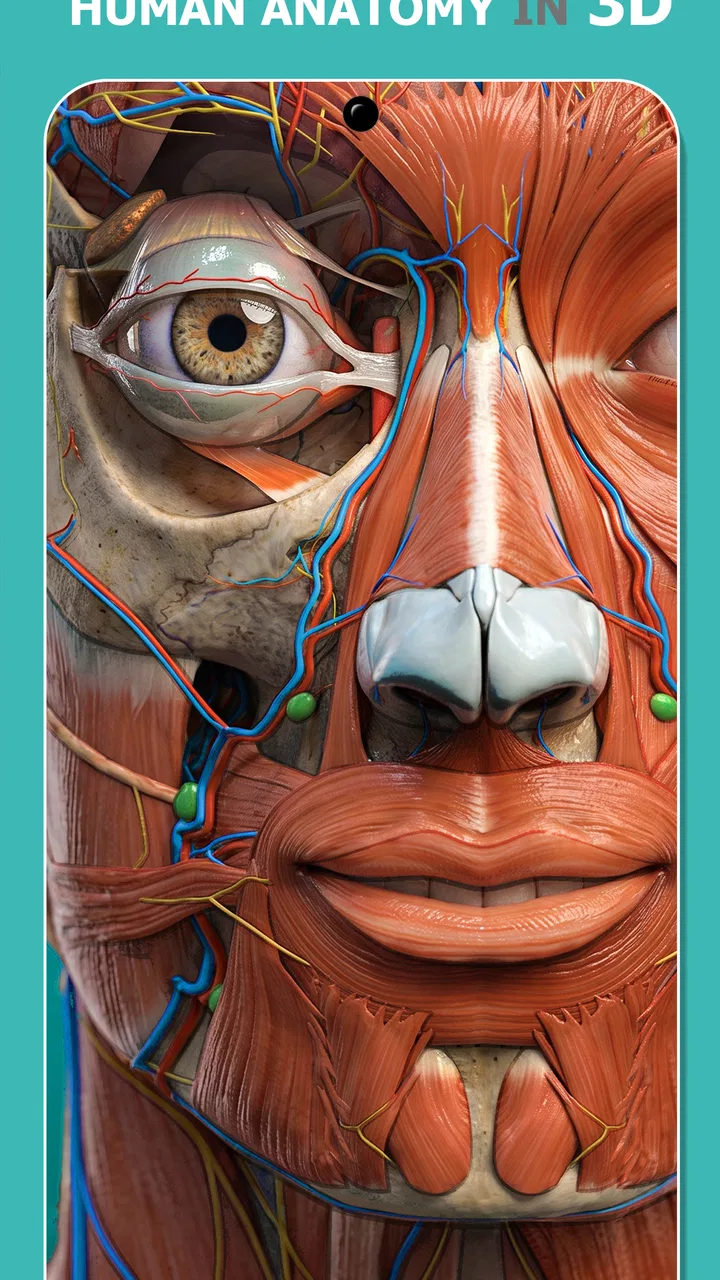
I found Anatomy Learning By Dr. Blanco most useful when I treated it as a visual study desk rather than a replacement for a textbook or a medical professional. This medical app, developed by 3D Medical OU, lets me approach anatomy through an interactive three-dimensional model, which makes it easier to connect a structure’s name with its position and neighboring parts. For a first-time user, the biggest advantage is that I can explore at my own pace instead of trying to understand a flat illustration immediately.
The app is free to start, carries an Everyone content rating, and has built a 4.5 average from around 161 thousand ratings. Its audience is broad: students, healthcare learners, curious users, and anyone who wants a clearer visual explanation of the human body. I would still be careful about expecting it to teach clinical reasoning by itself. It is strongest at orientation, recognition, and revision.
Getting from installation to useful anatomy practice
I start by giving myself a small, practical goal before opening the model: one body region, one relationship I want to understand, and one question I can answer from memory afterward. That keeps the first session from turning into aimless rotation and makes it easier to tell whether the visual approach is helping. From there, I can decide what to expect as I begin exploring.
You May Also Like

 AccuWeather: Weather Radar
AccuWeather Review: A Quick, Clear Forecast for Everyday Decisions
For everyday plans, the best forecast is the one you can understand quickly. AccuWeather makes rain timing, radar, and local conditions easy to act on, with a few trade-offs.

 Hill Climb Racing
Why Hill Climb Racing Still Turns Crashes Into One More Run
A tiny car, a bumpy hill and one more upgrade: Hill Climb Racing keeps resurfacing because its simple chaos makes every near-miss feel personal.

 AliExpress - Shopping App
AliExpress Makes Global Shopping Feel Personal, but Shoppers Bear the Risk
AliExpress turns a global marketplace into a pocket-sized discovery engine. Its reach is useful, its shopping loop compelling, and its trade-offs easy to miss.

 Lords Mobile: Kingdom Wars
Lords Mobile Is a Kingdom-Building Routine, Not a Quick Match
A case-by-case verdict on the building, battles, device demands, and social commitments that make Lords Mobile rewarding for some players and exhausting for others.

 PDF Scanner app - TapScanner
TapScanner Makes Paperwork Easier to Capture, Check, and Share
TapScanner makes scanning with a phone feel less like a rescue operation and more like a dependable step in getting work done. Its capture tools are useful, though not flawless.

 Block Blast!
 Shows How Much a Puzzle Game Can Leave Out
A quiet grid game shows why puzzle players increasingly value instant clarity, repeatable skill and low-pressure play—and where the genre still needs to catch up.
More From Our News Desk
View All News


What to expect when you open it
The first impression is that this is a model-based learning tool, not a scrolling encyclopedia. Instead of reading long entries first, I can move through the body and inspect structures in context. That difference matters. When I was trying to understand where one structure sat in relation to another, rotating the model gave me a more practical sense of depth than a single diagram could provide.
The experience is especially helpful for learners who struggle with memorizing isolated labels. A name becomes easier to remember when I see what lies above it, beneath it, or beside it. I can also return to the same region several times, changing my viewing angle until the arrangement feels familiar. That repeated spatial exposure is one of the app’s real strengths.
It is worth setting expectations before exploring. This is not a diagnosis tool, and I would not use an image in the app to interpret pain, swelling, or another symptom. Human anatomy also varies, and a simplified educational model cannot represent every individual difference. For health decisions, I would rely on a qualified clinician rather than trying to match a body part inside the atlas.
The app has been available since March 20, 2014, and the current version is 3.1.500. It supports Android 7.0 and later, so users with older devices should check compatibility before planning their study routine. The large install base, now over 10 million installs, suggests that it has become a familiar option for anatomy learners, but popularity does not remove the need to decide whether its visual approach suits the way you study.
First setup without making the process harder
After installing, I recommend beginning with a short, focused session rather than attempting to inspect the entire body. Pick one region you already need for class or work. The head, upper limb, thorax, or lower limb can all become manageable starting points when the goal is limited to recognizing a few relationships.
My preferred setup is simple. I keep a notebook or digital note open beside the app and write three things: the structure’s name, what surrounds it, and one visual clue that helps me identify it. This turns passive browsing into retrieval practice. For example, instead of copying a label, I might note that a structure is identifiable by its position between two familiar landmarks. The app supplies the view; I supply the memory work.
Do not begin by rotating continuously. That can make the model feel impressive but does not necessarily improve recall. I first find a comfortable orientation, study the visible structures, then rotate only when I have a question. This creates a useful cause-and-effect loop: I want to know what is behind a region, so I turn it; I want to know what is beneath a layer, so I adjust the view. The movement becomes part of the lesson rather than decoration.
Some users may encounter a learning curve simply because three-dimensional controls are less immediate than a printed page. If the model feels confusing, reduce the task to one landmark and identify it from two angles. Once that landmark is stable, use it as an anchor for nearby structures. This is much less frustrating than trying to memorize every visible label at once.
The app includes optional purchases ranging from $0.99 to $59.99 per item. I would not decide about those immediately. First, use the free experience long enough to see whether the navigation style, level of detail, and study workflow actually fit your needs. A paid addition is only worthwhile if it solves a specific problem in your routine, such as needing more depth for a course or wanting a broader reference experience.
Your first meaningful success
For a first successful session, I would choose one small objective: identify a handful of structures in a single region, hide or move away from obvious visual clues when possible, and then name them without looking at notes. The point is not to complete a whole chapter. The point is to finish with evidence that you can recognize something you did not know a few minutes earlier.
A practical example is a student preparing for a lab class. Before class, I would open the relevant body region, inspect it from the front, then turn it to a side or rear view. I would write down the structures I expect to encounter and close the app. Later, I would reopen the same region and test myself before reviewing the labels. That second pass is more valuable than simply leaving the model open while reading.
Another useful workflow is to study in layers. Start with a broad orientation, then focus on a particular system or set of structures, and finally return to the broader view. This prevents the common mistake of learning a part so closely that you forget where it belongs in the body. The model is most helpful when I move between local detail and overall placement.
I also recommend using the app before a conversation with a doctor only to improve vocabulary and questions, not to self-diagnose. If I want to understand where a clinician mentioned a joint or organ, a three-dimensional view can make the explanation less abstract. But I would still ask the clinician to interpret what that structure means in my own situation.
Confusion points that can slow down beginners
The first common confusion is mistaking visibility for importance. A structure that stands out in a model is not automatically the structure that matters most for a particular lesson. I try to follow a syllabus, lecture, or trusted anatomy reference and use the app to clarify spatial relationships. Without that outside goal, it is easy to spend time exploring interesting areas without retaining them.
The second is assuming that a label equals understanding. I can recognize a word on screen and still be unable to locate it later. To avoid that trap, I periodically look away from the model and describe the structure in my own words. If I cannot explain how to find it using nearby landmarks, I have probably only recognized the label rather than learned the anatomy.
Layered anatomy can also be mentally demanding. When several structures overlap, the view may not answer my question instantly. I handle this by changing one thing at a time: rotate first, then inspect the region again, then explore another viewing angle. Rapidly changing every available control makes it harder to know which action actually revealed the relationship I wanted.
There is also a difference between learning for an exam and browsing for general understanding. For exam preparation, I need an active plan, written recall, and repeated testing. For general education, I can spend more time exploring how regions fit together. The app supports both, but it does not automatically turn casual exploration into a structured curriculum.
Beginners may wonder whether they need prior anatomy knowledge. I do not think advanced knowledge is required to begin, but a small amount of preparation helps. Learning a few directional terms and basic body regions first makes the three-dimensional model far less intimidating. If every label is unfamiliar, I would start with broad orientation and add vocabulary gradually rather than trying to decode the full view.
How it compares with ordinary alternatives
A printed anatomy atlas is still better when I want a stable page for annotation, quick side-by-side comparison, or a quiet study session without navigating a model. Paper also makes it easy to build a personal sequence of notes. The trade-off is that a page cannot provide the same immediate sense of depth and rotation.
Static diagrams and ordinary image searches can be faster for answering one narrow question. If I only need to confirm the general position of a familiar organ, opening a full interactive atlas may feel excessive. On the other hand, random images often vary in style and labeling, while a dedicated anatomy app gives me a more consistent environment for returning to the same region.
Video lessons are often better for guided explanation. A good instructor can connect anatomy with movement, symptoms, or clinical context in a way that an interactive model does not automatically provide. I see this app as a companion to that material: I use the video for the explanation and the atlas for spatial checking and self-testing.
Compared with a traditional reference app built mainly around text, this one makes more sense for visual learners and for anyone who keeps confusing front, back, superficial, and deep relationships. It is less suitable for someone who wants concise written definitions, clinical cases, or a ready-made study schedule. In that situation, another resource may be the better primary tool, with this app serving only as a visual supplement.
Taking the next step without overcomplicating study
Once I can identify a region from more than one angle, I move to relationship questions. Instead of asking only “What is this?”, I ask “What is next to it?”, “What would I see from behind?”, and “Which landmark would help me find it again?” These questions turn the model into a navigation exercise and expose gaps that simple label recognition hides.
I also like alternating short exploration with recall. I might spend a few minutes examining a region, close the app, sketch a rough arrangement from memory, and then reopen it to compare. The sketch does not need to be artistic. Its value is showing whether I understand placement or merely remember an image.
For students, the best routine is to connect each session to a real academic task. Use the app before a practical class to preview unfamiliar structures, after class to rebuild the spatial map, and before an exam to test recognition without relying on the original presentation order. That three-stage use is more effective than one long session because it revisits the same information in different contexts.
For families or younger users, the Everyone rating makes the app approachable, but I would still guide the first session if the learner is very young. Medical terminology can be dense, and a parent or teacher can translate the labels into simpler language. The app can encourage curiosity, but the learning outcome improves when someone helps connect the model to a lesson or question.
Storage, screen size, and device performance can affect comfort even when the operating system is supported. A larger screen makes detailed exploration easier, while a small phone display may require more zooming and patience. I would test the app on the device I actually plan to study with before buying any optional content. Convenience matters because a technically capable atlas is less useful if the interface feels cramped during every session.
My final recommendation is straightforward: try Anatomy Learning By Dr. Blanco if you learn best by seeing how body structures occupy space. It offers a free entry point, an accessible age rating, and enough visual depth to make anatomy less flat and abstract. I would recommend it particularly to beginners who need orientation and to students who want a companion for lab preparation.
I would skip it as a main resource if you need detailed clinical interpretation, instructor-led teaching, or a text-first reference. I would also avoid judging it after a single unfocused browsing session. Give yourself one region, one question, and one recall test. If that process helps you remember where structures are rather than merely recognizing them on screen, the app has earned a place in your study routine.
With more than 3,800 reviews and a long presence in the medical-learning category, it is clearly an established choice, but my reason for recommending it is more practical: it makes spatial anatomy something I can actively investigate instead of passively memorize. Used with notes, a trusted course resource, and sensible limits around medical advice, it can become a reassuring first step from installation to genuine understanding.
FAQs for Anatomy Learning - 3D Anatomy
01What is the main purpose of Anatomy Learning by Dr. Blanco?
Anatomy Learning by Dr. Blanco is designed to provide a comprehensive and interactive platform for studying human anatomy. The app offers detailed 3D models and guided tutorials that help students, educators, and medical professionals gain a deeper understanding of the human body and its systems.
02Is Anatomy Learning by Dr. Blanco suitable for beginners?
Yes, the app is highly suitable for beginners as well as advanced users. It offers a user-friendly interface with various learning modules tailored to different skill levels. Beginners can start with basic anatomy concepts, while more experienced users can explore complex structures and systems.
03What features does Anatomy Learning by Dr. Blanco offer?
The app includes a range of features such as interactive 3D models, quizzes, tutorials, and customizable learning paths. Users can zoom in on specific body parts, rotate models, and access detailed descriptions. The app also regularly updates its content to include the latest anatomical research.
04Are there any in-app purchases or subscriptions required?
Anatomy Learning by Dr. Blanco offers both free and premium content. While the basic features and models are accessible without charge, advanced modules and detailed tutorials may require in-app purchases or a subscription. This allows users to tailor their experience based on their educational needs.
05Can Anatomy Learning by Dr. Blanco be used offline?
Yes, Anatomy Learning by Dr. Blanco can be used offline, making it convenient for users to study without needing a constant internet connection. However, some features, such as updates and certain interactive elements, may require internet access to function optimally.
Pros
- Comprehensive 3D anatomical models.
- User-friendly interface with intuitive navigation.
- Regular updates with new features.
- Highly detailed visuals and textures.
- Offline mode available for easy access.
Cons
- Requires significant device storage space.
- Some features locked behind a paywall.
- Occasional app crashes reported by users.
- Limited language options for instructions.
- Performance issues on older devices.

Anatomy Learning - 3D Anatomy
Gallery